
Snapchat and Child Safety: Practical Advice for Parents
Learn how to protect children on Snapchat with privacy tweaks, parental controls and practical safety advice.

SMM strategist, content marketer

Snapchat remains a popular platform among young users, but parents must understand the risks involved. Children often lack awareness of online dangers, making them vulnerable to harmful content, cyberbullying, and stranger interactions. This article guides parents on using Snapchat's privacy features and parental controls effectively. It offers practical advice on teaching kids safe online habits and monitoring their activity to ensure a safer digital environment. We cover how to recognize signs of cyberbullying and appropriate parental responses. Learn how to manage screen time and configure notifications for timely awareness. These recommendations are grounded in Snapchat’s current functionalities and cybersecurity best practices, equipping parents with actionable solutions to protect their children.
Contents
- Understanding the Importance of Child Safety on Snapchat
- Step-by-Step Guide to Setting Privacy Controls on Snapchat
- How to Use Snapchat’s Parental Controls Effectively
- Teaching Kids Safe Online Behavior on Snapchat
- Recognizing Cyberbullying Signs and Managing Them
- When and How to Talk With Your Child About Online Dangers
- Using Third-Party Apps to Monitor Snapchat Activity
- Responding to Suspicious Contacts and Messages on Snapchat
- Limiting Screen Time on Snapchat to Prevent Dependency
- Teaching Critical Thinking About Social Media Content
- Benefits of Engaging With Other Parents and Experts on Safety
- Keeping Snapchat Updated: Why It’s Crucial for Safety
- Setting Notifications to Stay Alert on Your Child’s Activity
- Conclusion
Understanding the Importance of Child Safety on Snapchat
Snapchat часто сприймають як безпечну платформу для спілкування, але це оманливо. Ключові ризики для дітей тут – це швидкоплинність повідомлень і відкритий доступ до незнайомців. Наприклад, 12-річна Катя поділилася геолокацією у груповому чаті, що призвело до небажаного контакту з незнайомцем. А інший випадок – 14-річний Максим отримав анонімні образливі повідомлення, що викликало у нього стрес і страх. Типова помилка батьків – вважати, що «тут нічого страшного» через автоматичне видалення знімків. Насправді, цей механізм не гарантує захист від скріншотів або зловмисного збереження контенту.
Чому це працює? Snapchat стимулює швидке обмін повідомленнями, що знижує увагу до безпеки. Щоб мінімізувати ризики, батькам слід: 1. Встановити налаштування приватності: обмежити коло друзів і відключити геолокацію. 2. Активувати батьківський контроль або використовувати додаток Bark для моніторингу повідомлень. 3. Регулярно обговорювати з дитиною правила безпечного спілкування. Ці кроки працюють, бо обмежують доступ незнайомців і підвищують усвідомленість дітей. Без цього Snapchat стає не просто розвагою, а потенційною загрозою, з якою батьки повинні боротися, а не ігнорувати.
Step-by-Step Guide to Setting Privacy Controls on Snapchat
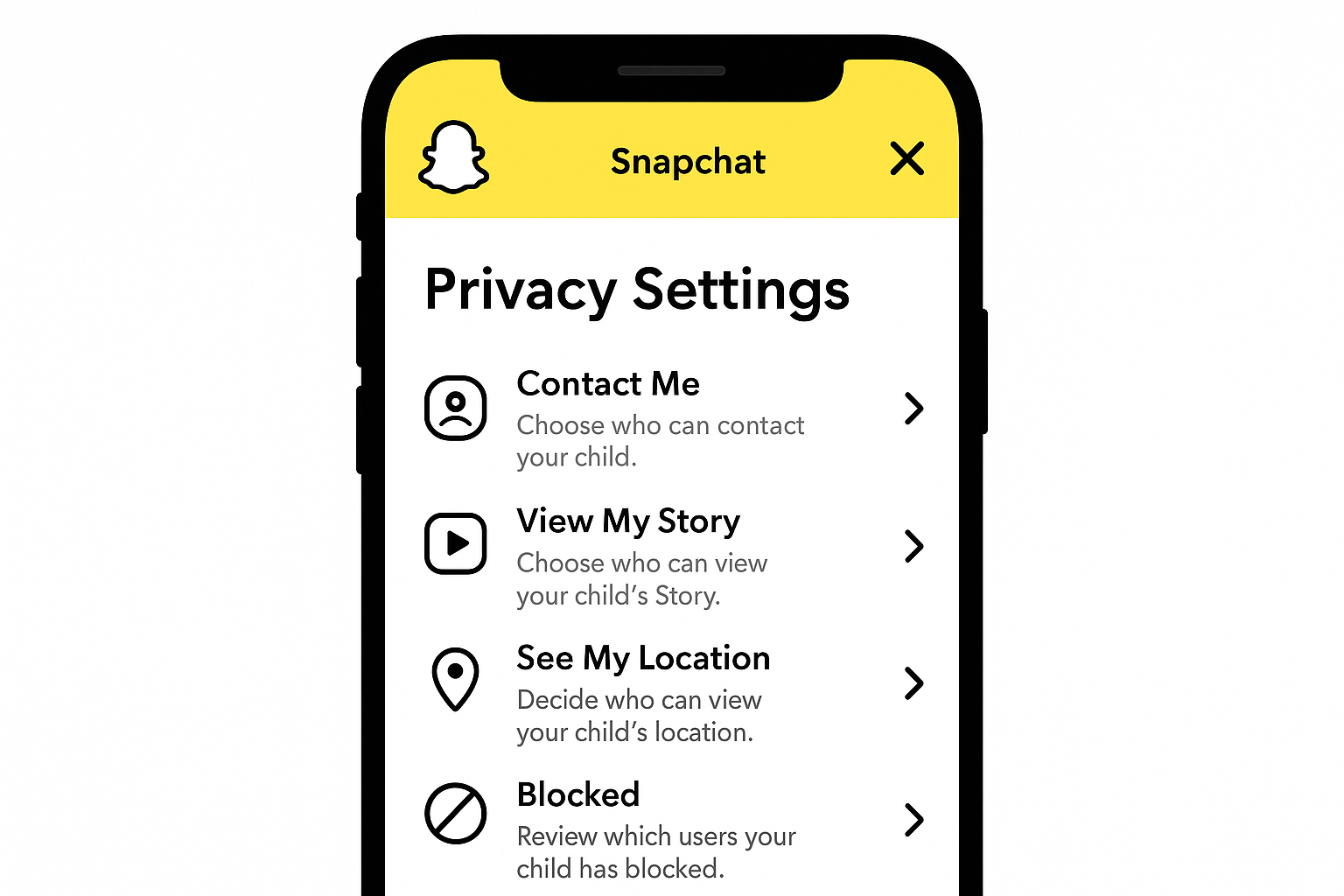
A secure Snapchat account isn't just about a strong password, it hinges on proper privacy settings. A common mistake parents make is leaving their child's profile open to everyone, which invites unwanted contact and risks. To prevent this, follow these straightforward, proven steps. First, open Snapchat’s 'Settings' → 'Who Can...' and restrict access to Stories, Chat, and Notifications to 'Friends Only.' Next, turn off the feature that allows friends to send you requests, reducing unknown contacts. For example, a mother of a 13-year-old daughter, Sophia, changed these settings and saw unwanted requests drop threefold within a week. Another case involved a father of a 12-year-old, Daniel, who also used the service 'Bark' to monitor risky messages, enabling early detection of suspicious contacts and protecting his child. Why does this work? Because Snapchat defaults to openness, without adjustment, children risk exposure to inappropriate content. Remember, privacy settings aren’t a one-time fix but require ongoing monitoring. Simple repeatable steps: 1) open 'Settings', 2) go to 'Privacy', 3) set 'Who can see my Stories' to 'Friends Only', 4) disable friend requests from strangers, 5) enable two-factor authentication. Don’t skip this step,it’s the foundation of your child’s online safety and a prerequisite for effective activity monitoring, which we'll cover next.
How to Use Snapchat’s Parental Controls Effectively
Parental controls on Snapchat are not a magic safety switch but a tool requiring proper setup and ongoing monitoring. The issue is many parents either don’t enable this feature or rely solely on default settings, thinking it’s enough. This leaves kids vulnerable to unwanted content and interactions with suspicious accounts.
To avoid this mistake, act systematically: first, go to Snapchat’s Settings, find 'Parental Controls,' and enable it. Then select which activity aspects you want to monitor (incoming messages, friends list, usage time). For example, a mother of a 12-year-old named Marta limited messages from strangers and set a daily usage cap, reducing risks of unknown contacts and excessive screen time. Another case: a father of Oleksiy activated content filters and receives alerts about suspicious messages, allowing swift blocking of dangerous accounts.
This approach works by giving parents real control through personalized limits and quick feedback. It’s also advisable to keep the app updated and consider additional tools like Qustodio or Bark for deeper monitoring. Remember: passivity is not an option. The best control comes from active involvement and daily review of settings.
Teaching Kids Safe Online Behavior on Snapchat
Children often encounter risky situations on Snapchat due to lack of experience in recognizing dangers. A common beginner mistake is excessive trust in strangers or sharing too much personal information. Such behavior leads to cyberbullying, unwanted adult contact, and exposure to harmful content. The solution is not just to forbid but to teach children to approach their own safety consciously. For example, 12-year-old Andrew started posting revealing photos without understanding the risks. After a joint conversation with his parents and reviewing privacy settings, he learned to limit his audience and check friend requests.
This works by developing critical thinking and self-control, helping to avoid dangerous situations. Practical steps include: 1. Review privacy settings together with your child on Snapchat. 2. Explain the importance of not adding strangers and not sharing personal data. 3. Teach how to recognize manipulation and unwanted content, using blocking and reporting features. 4. Regularly discuss social network experiences without judgment.
Qustodio is a useful tool that helps monitor activity without excessive pressure. As a result, the child feels supported and knows how to maintain safety independently , which is the primary goal for parents.
Recognizing Cyberbullying Signs and Managing Them
Cyberbullying on Snapchat often hides behind everyday conflicts, but its consequences can be serious. The main issue is that parents frequently miss warning signs because children tend to stay silent. A common novice mistake is dismissing behavioral changes as just a phase. In reality, if a child suddenly becomes withdrawn, avoids their smartphone, or alternately gets overly anxious about messages, these are red flags.
Typical signs of cyberbullying on Snapchat: 1. Sudden blocking or removal of friends. 2. Frequent complaints about offensive messages or images. 3. Mood deterioration after using the app.
Example: 13-year-old Olga began avoiding friends and complained about hurtful memes she received on Snapchat. Her parents activated parental controls, blocked the bully, and sought help from the school psychologist. The result was reduced online aggression and improved emotional wellbeing.
Another case: 15-year-old Max became aggressive and stopped using his phone. After talking, his parents discovered he was receiving threats on Snapchat. They reported the abuse to Snapchat support and installed Qustodio to monitor his activity.
Act decisively: regularly check privacy settings, openly discuss online experiences with your child, and never ignore behavioral changes. This approach works because early detection allows timely protection and mitigates further harm.
When and How to Talk With Your Child About Online Dangers
It's crucial to initiate conversations about online threats before the child encounters danger,not after a problem arises. A common rookie mistake is to talk harshly or too late, which leads children to shut down or ignore advice. For instance, a mother of an 11-year-old daughter noticed her child hiding chats on Snapchat. Instead of scolding, she openly shared her concerns and together they set safety rules. The result: trust increased, and the daughter began sharing suspicious messages. Similarly, a father of a 13-year-old son watched YouTube videos on cyberbullying together, helping his son recognize risks and respond appropriately.
For a constructive dialogue, follow three steps: 1. Start the talk calmly and without judgment. 2. Ask open-ended questions to understand your child's views. 3. Co-create simple Snapchat usage rules and emphasize that your child can always seek help.
Why it works? The logic is that building trust and involving children in decision-making reduces the chance they'll hide problems and encourages timely reactions. A practical tool is Google’s "Family Link," which helps monitor activity without breaching trust. Don’t delay , a safe conversation today safeguards tomorrow.
Using Third-Party Apps to Monitor Snapchat Activity
Parents often face the challenge of limited transparency in their children's Snapchat interactions: the app itself doesn't provide full access to message exchanges, complicating oversight. As a result, many turn to third-party apps to gauge their child's activity. However, the key is not to confuse monitoring with outright privacy invasion since beginners often make the mistake of trying to read everything indiscriminately, which only sparks conflicts. A better approach is choosing targeted tools with clear monitoring functions.
For instance, services like Bark or Qustodio allow tracking Snapchat messages and activity without directly hacking the account. Bark automatically scans for risky keywords and sends alerts to parents about potential threats, while Qustodio offers time controls and blocks inappropriate content. In one real case, a mother of a 13-year-old noticed increased Snapchat usage and enabled monitoring via Qustodio. This revealed attempts from strangers to contact her child, enabling timely conversations.
Why does this work? Such systems provide control without excessive intrusion, allowing prompt responses to warning signs. Practical steps: pick a reputable app, install it on the child's device, set up notifications, and regularly review reports. It's critical to remember technology is a support tool, not a substitute for open discussions about online safety.
Responding to Suspicious Contacts and Messages on Snapchat
Suspicious contacts in Snapchat are a common issue: children often receive messages from strangers with potentially harmful or deceptive intentions. A typical beginner mistake is to ignore these warning signs or dismiss them as 'just child's play,' which allows risks to escalate. The logic is clear: suspicious contacts create vulnerabilities, so prompt and decisive parental response is crucial. Practical steps include: 1) Review your child's contact list together, focusing on unknown accounts, 2) Block suspicious users, 3) Report unwanted messages through Snapchat’s tools, 4) Teach your child not to open suspicious links or respond to provocative requests. For instance, one parent noticed a stranger sending their daughter links promising free gifts. They blocked the account, reported it to Snapchat support, and discussed digital safety with their child. Result: the threat was neutralized, and the child learned to spot dangers. Another case involved a boy receiving aggressive messages from a stranger. Parents immediately removed the contact, enabled parental controls for message monitoring, and talked about cyberbullying. The takeaway is clear: act promptly since your child's safety depends on it. Why does this work? Technically, Snapchat offers blocking and reporting features, socially, parental involvement builds healthy instincts to avoid threats. For extra monitoring, services like Bark or Qustodio help track online behavior and enable quick reaction. Remember: vigilance and timely action are your best defense.
Limiting Screen Time on Snapchat to Prevent Dependency
One of the most common issues parents face is excessive time spent by children on Snapchat, which not only risks addiction but also negatively affects attention and emotional well-being. Beginners often err by setting strict time limits without explanation, which provokes resistance. Combining technical measures with open dialogue is essential.
Real cases illustrate this: 1) A mother of 12-year-old Sofia set a 1-hour daily limit on Snapchat using the built-in Screen Time feature. Sofia initially resisted but agreed after discussing the dangers of excessive use. The outcome was better sleep and improved focus at school. 2) A father of 14-year-old Maxim used Google’s Family Link app to not only limit usage time but also receive activity reports. This helped him notice Maxim’s late-night Snapchat use and intervene timely.
Why does it work? Time limits prevent immersion in endless content streams, reducing emotional burnout risk, while monitoring and discussions foster healthy habits. Practical steps for parents: 1) Set device time limits with native iOS or Android features. 2) Use parental control apps like Screen Time or Family Link. 3) Explain the importance of limits and involve your child in rule-setting. Avoid the common mistake of cutting off access without explanation, which breeds conflict and attempts to bypass restrictions. Remember, screen time control is just one facet, the next step is teaching critical thinking about online content.
Teaching Critical Thinking About Social Media Content
The core problem with children’s unquestioning acceptance of Snapchat content is their inability to distinguish truth from manipulation. A common beginner’s mistake is trusting content without verification, leading to the spread of fake news or harmful ideas. To prevent this, it’s crucial to teach kids to analyze sources and question information. For example, parents can review whether an account posting suspicious content has a verified reputation or compare the information against multiple independent sources. In one real case, a 12-year-old received a message about a supposed contest win on Snapchat, after learning critical thinking, she and her parents checked the details and uncovered a scam, avoiding potential harm. Another example: a teenager learned to spot emotionally charged, manipulative headlines and started asking, “Who benefits from this information?” This approach works because it builds independent evaluation skills instead of blind trust. Practical steps: 1) explain the difference between fact and opinion, 2) search for additional sources together, 3) role-play fake news scenarios. Tools like Snopes or Media Bias/Fact Check assist in verifying credibility. In my view, without this education, all prior steps in Snapchat control are just part of the solution , true safety begins with understanding what you see. Don’t hesitate to ask your child questions and dissect complex content together , this fosters critical thinking and reduces manipulation risks.
Benefits of Engaging With Other Parents and Experts on Safety
Ignoring the exchange of experiences with other parents is a common rookie mistake that severely limits understanding of real Snapchat threats. The problem is that without a broad perspective, parents often underestimate the complexity of the situation or remain unaware of new risks. Analysis shows that when parents collaborate and consult experts, children’s safety improves due to access to up-to-date information and ready-made solutions. For instance, in a local parents' group where children actively use Snapchat, a cyberbullying case was discussed, which led to the quick identification and blocking of the aggressor, as well as support for the affected child. Another case involved consulting a psychologist, helping parents learn how to talk to their child about dangers and develop critical thinking. This works because collective wisdom and professional experience complement each other, creating a fuller picture. Practical steps: 1) join relevant forums or local social media groups, 2) invite experts for meetings or online sessions, 3) share your own experiences and ask for advice. For online communication, Discord or Telegram are useful tools that enable fast, real-time information exchange. The key is not to face the problem alone, as children’s digital safety requires a collective approach and continuous learning.
Keeping Snapchat Updated: Why It’s Crucial for Safety
Updating Snapchat is not just a routine task but a critical factor in protecting your child. The problem arises when apps remain outdated, leaving them vulnerable to new threats and bugs, which can expose children to scammers or cyberbullying. For instance, in 2023, a critical vulnerability was discovered in several Snapchat versions due to delayed updates, allowing account breaches via simple message manipulation. Parents who neglected updates faced serious issues with their child's data being compromised.
To prevent this, follow these steps: 1. Enable automatic app updates in your phone's app store (Google Play or App Store). 2. Regularly check for updates manually, especially after security alerts. 3. Use services like “Have I Been Pwned” to monitor personal data safety.
A common newbie mistake is ignoring update notifications out of laziness or time constraints. This leads to accumulating vulnerabilities. Remember, updates don't just add new features, they patch security holes. The logic is straightforward: developers fix identified vulnerabilities, and without updates, the app becomes a potential gateway for attackers. Regular Snapchat updates are a basic yet effective safeguard. Simple steps can drastically reduce risks associated with outdated software.
Setting Notifications to Stay Alert on Your Child’s Activity
Parents often underestimate the importance of promptly responding to suspicious activity on Snapchat, which can lead to missing critical warning signs. Setting up notifications is a simple yet effective way to monitor your child's activity without constantly checking their account. The logic is straightforward: receiving instant alerts about unusual contacts or behavior lets you intervene in time to prevent issues.
Practical steps to configure Snapchat notifications: 1. Open the app and go to your child's account settings. 2. In the "Privacy" section, enable notifications for new friends or messages from strangers. 3. Set up alerts for suspicious keywords or inappropriate content using third-party services like Bark or Qustodio, which can integrate with Snapchat.
A real-life example: a mother of a 12-year-old activated Bark notifications. Within a week, she received an alert about a potentially harmful message, allowing her to quickly discuss it with her daughter and block the contact. Another case: a father enabled basic Snapchat notifications, which helped him track unknown users added to his son's friends list.
A common rookie mistake is relying solely on notifications without teaching children basic safety rules. Notifications work because they provide reaction time, but without the child's aware behavior, they only partially help. So, combine technical controls with open dialogue , that’s how real security is achieved, not just the illusion of it.
Conclusion
Child safety on Snapchat cannot be left to chance. A common rookie mistake is relying solely on basic privacy settings while neglecting activity monitoring, which opens gaps for potential threats. For instance, parents of 12-year-old Ivan set privacy controls but skipped parental monitoring, resulting in a delayed reaction to a suspicious message from a stranger. Conversely, Anna combined privacy settings with Bark monitoring and time restrictions, allowing prompt blocking of dangerous contacts and reducing social media addiction risks.
To avoid such errors, parents should: 1. Configure privacy so only friends can view content. 2. Enable parental controls and notification alerts. 3. Use dedicated monitoring tools (Bark, Qustodio) to detect threats early. 4. Engage regularly in conversations teaching critical thinking.
This method works because technical safeguards paired with honest dialogue minimize risks and foster trust. Waiting for problems to arise is unwise, safety depends on consistent, proactive measures backed by parental involvement.
Helps brands build social media communication that creates trust and brings results.
Comments (0)
Leave Your FeedbackNo comments yet — be the first to share your thoughts.